
Fancy Cafe AI With a Friend: Cast the Wrong-Seat Joke
Make a First Time in a Fancy Cafe AI video with a friend. Plan the two roles, choose separate selfies, and keep the wrong-seat reveal easy to follow.
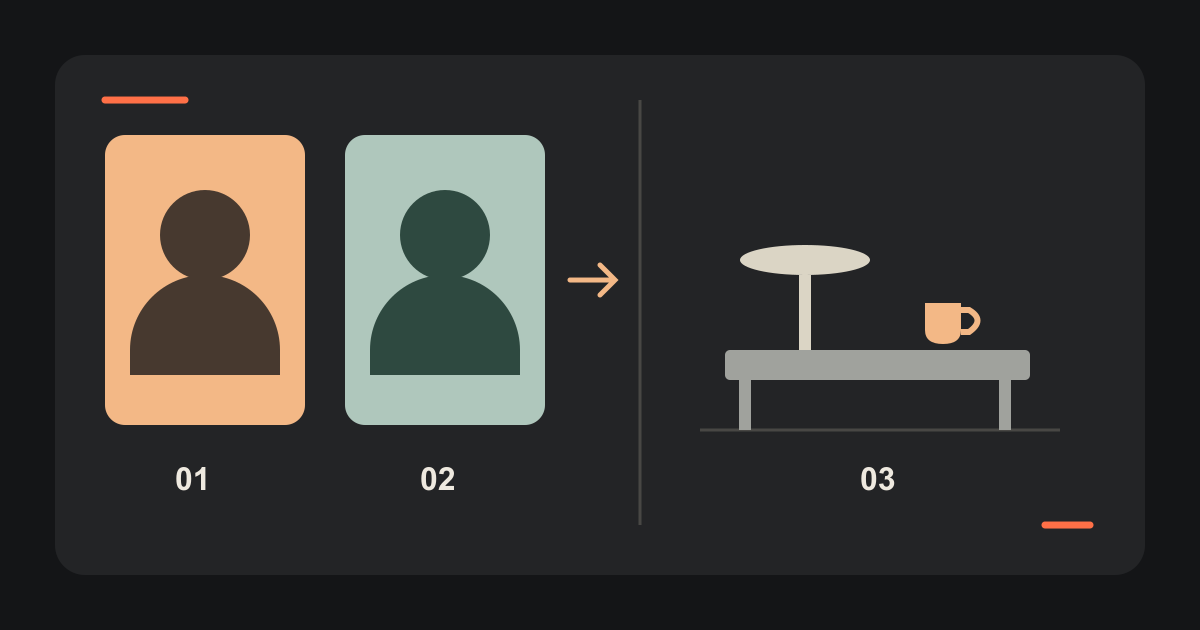
Two friends enter the same café scene with very different amounts of confidence. One has already claimed the tiny wall table as a seat. The other sits on the bench and puts a cup exactly where a cup belongs. That small, ordinary gesture exposes the whole mistake.
For a Fancy Cafe AI video with a friend, casting is the interesting decision. Choose who would confidently get the furniture wrong and who would quietly let them work it out. The familiar faces give the scene a reason to exist in your group chat.
This guide looks at AI Fancy Cafe at aifancycafe.video through that creative choice. Product details were checked on November 9, 2026; this is an editorial walkthrough of its public workflow, without a paid generation test. Leer en español.
Start with the reveal, then choose the cast
If you arrive from a Bulin 47 freestyle video, you may be thinking about movement, attitude and a strong entrance. The café scene rewards a different instinct. Let the second person do something completely normal.
The bench and table establish the misunderstanding. The arriving guest explains it simply by using them correctly. An extravagant caption can explain the punchline before the video gets there, leaving the reaction with little work to do.
Try casting yourself as the confidently mistaken guest and your most observant friend as the arrival. That gives the joke an affectionate target. Ask both people whether they like their roles before choosing the photos, especially if the clip will leave a private chat.
How two selfies become a First Time in a Fancy Cafe video
The site's two-person guide assigns photo 1 to the person on the table and photo 2 to the guest arriving at the bench. Its With a friend option uses a fixed wall-corner café scene. You can supply portraits taken separately.
Treat those upload slots like casting notes. Write each person's name beside their role before adding the images. A swapped upload changes who carries the embarrassment, which can change the joke you meant to make.
For couples, agree on a playful premise first. “The one who always says they know this place” gives the first role a recognisable personality. For colleagues, keep the idea suitable for everyone pictured and agree on where it will be shared.
Choose photos that make the reaction readable
Look at the two portraits side by side at roughly the size of a phone screen. Can you recognise both people immediately? Is one face much smaller, darker or more turned away than the other? Fix those mismatches in your choice of source photos before spending on a render.
The site's photo guidance calls for a clear, front-facing portrait of one person, with good light and without sunglasses or heavy filters. It accepts JPEG, PNG and WebP; iPhone HEIC files need conversion to JPEG. These are input recommendations, rather than a guarantee of likeness.
For your own review, keep the original portraits handy. Compare the face at the entrance, the glance and the final position. A convincing opening frame is only part of the job; the same person needs to remain recognisable through the reaction.
A Fancy Cafe AI video without a CapCut template
AI Fancy Cafe's workflow comparison describes a browser-based remake generated from portraits. A CapCut template is a separate editing route, with requirements and terms that depend on the template you choose.
If your starting material is two selfies, the portrait-based route fits that input. If you already filmed a well-timed reaction, editing the footage gives you direct control over the pause and cut. Choose the workflow around the material you actually have.
The café tool lists a 15-second output and offers vertical 9:16 or horizontal 16:9. For a phone-first post, inspect the vertical composition with particular attention to the small table, the bench and both faces. All three tell the story.
Check the cost before treating a render as a rehearsal
The official free-versus-paid guide distinguishes free reference browsing and photo previews from paid video generation. At the time of checking, a 15-second video used 20 credits at 480p or 45 at 720p. Verify the displayed total before generating.
That makes planning worthwhile. Choose the roles and images first, then decide which resolution suits the intended use. Higher resolution adds pixels; it cannot repair a confusing premise. The two-person guide also says a fresh generation spends credits, so budget separately for another attempt.
Caption the confidence, let the furniture deliver the punchline
Here are three original caption ideas to try after reviewing the result:
- “I said I knew a place.”
- “My friend let me choose the seats.”
- “Five seconds of confidence. Then the coffee arrived.”
Pick the line that sounds like the person in photo 1. Keep it clear of the furniture and faces, watch the clip with sound, and check that the text leaves enough room for the reveal. Make the AI-made nature of the scene clear when sharing it.
Questions before making a café video with a friend
Can we use selfies taken in different places?
Yes. The official two-person workflow accepts separate portraits and supplies the shared café scene. Similar lighting and face angles give you a more consistent starting point.
Is there a free Fancy Cafe AI video generator on this site?
Browsing and photo previews are free. Finished video generation on aifancycafe.video uses purchased credits. Check the current offer on the site before starting.
What should we review before posting the result?
Check that each face stays with its assigned role, the table-to-bench reaction remains understandable, and everyone pictured is comfortable with the caption. Save the finished file promptly because the site uses temporary download links.
The useful final question is small: would your friend recognise themselves in the decision to take that seat? Get that detail right, and the café furniture has very little explaining left to do.
Author